Community Platforms
The Top 7 Podia Alternatives for Online Course Creators in 2026: User Reviewed
We have reviewed seven alternatives to Podia and compared how their course features, membership platform, and community focus compare.


Sofia Guimarães
Marketing Manager at Swarm, writing about how creators & experts can build human communities that last.
Podia has built a reputation as one of the platforms available to creators, offering a wide range of features.
Many online articles about Podia alternatives simply list the differences and similarities without actually testing the tools themselves.
The team behind Swarm has tested a range of Podia alternatives for this piece, so we can actually walk you through the differences and strengths each platform offers so you can make the right choice for your brand.
While we will talk about our own platform, Swarm, in this article, we will try our best to be pragmatic about the features on different platforms that will work best for different creators at different stages.
What does Podia offer course creators?
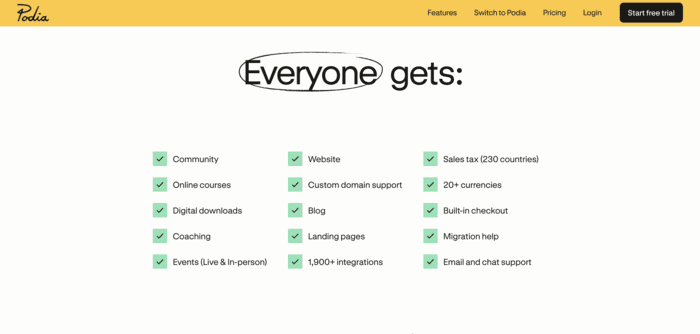
Podia is known as an all-in-one solution for creators. It offers creators the ability to have their website hosted and created, an email address to send out emails to subscribers, host online courses, coach clients, and build a community.
The screenshot below is a good summary of the features Podia offers:
Which creators are looking for Podia alternatives?
The consistent feedback we tend to see with Podia users who move over to Swarm is that Podia served them well as they were just starting out. However, as they grew, they felt they were outgrowing Podia and needed a platform that could grow with them.
Limited feature sets
Creators starting out often find Podia to have all the features they need, but as they grow further, they begin to encounter features missing that they cannot go without.
Examples of this would be:
Quizzes are limited to just multiple-choice questions. Advanced features like question banks or graded assessments are nonexistent. They do not unlock in a higher pricing plan; they simply do not exist on Podia.
Content integration: Other platforms allow you to mix media types, like adding a course and a video into one lesson. Podia only allows you to create these as separate entities, which limits how much course customization creators have access to.
Drip content scheduling that unlocks modules gradually over time or only when a previous module is completed is unavailable.
Community features feel like an afterthought
Podia has some strong course features, but its community features are limited compared to other platforms.
Members can send each other text messages but not audio or video. Swarm focuses on community by having features like threaded discussions or customizable hubs that can be created for each topic of discussion.
Podia does not seem to focus on more than a few basic community features that most platforms these days would consider bare minimum, so if community is your focus, another platform might be a better bet.
No mobile app experience
Most alternatives offer native iOS and Android apps. Podia is limited to a mobile-friendly website, which simply does not cut it in the world of courses today.
Growth blockers
The lack of a native mobile app, limited analytics, or a lack of advanced A/B testing are examples of ‘growth blockers’ for creators as they scale their brand.
Even a coupon once created cannot be edited. The user must archive it and create a brand new one.
These features are ordinarily not roadblocks for new creators, but they gradually add up as the months go on and brands scale.
How do you choose the right Podia alternative for your brand journey?
We have dived further into features, pricing, and differences in the specific platform sections below, but the table here can help you get a quick glimpse of the differences and features in each platform.
Note: Pricing below reflects monthly billing. Most platforms will give you a discount if you pay for a year at a time. Some platforms, like Circle, only allow annual billing, which tends to be restrictive.
Platform | Highlights | Pricing for the base plan | Transaction Fees |
Podia creators who want to boost course completion through community, accountability and peer learning | $29/month | 10%, 2%, and 0.5 % on Launch, Growth, & Scale plans respectively | |
Podia creators who are struggling to create a sense of community for members. | $95/ month | Starting at 5%, goes down to .50% as you level up to a higher plan | |
Podia creators who need heavy customization and branding features | $89/month (billed annually only) | 1–2% depending on plan | |
Podia coaches who want a strong course experience and aren't focused on building a community. | $179/ month | Transaction fees apply and vary (Reference), 0% platform transaction fees if using the native Kajabi payment processor. | |
Podia creators who are sticking to only selling courses but have outgrown Podia. | $54/ month | Transaction fees apply and vary (Reference), 0% platform transaction fees if using the native Thinkific payment processor. | |
Podia creators who are looking to grow with more marketing features, but still have an easy-to-use platform with an easy learning curve. | $39/month | 7.5% transaction fee on starter plan; 0% on other plans | |
Podia creators who are looking for a simple community-focused platform and don't need multiple course features. | $9/month | 10% transaction fee on Hobby plan, 2.9% on Pro |
Swarm: A video-first alternative to Podia built for peer learning & completion
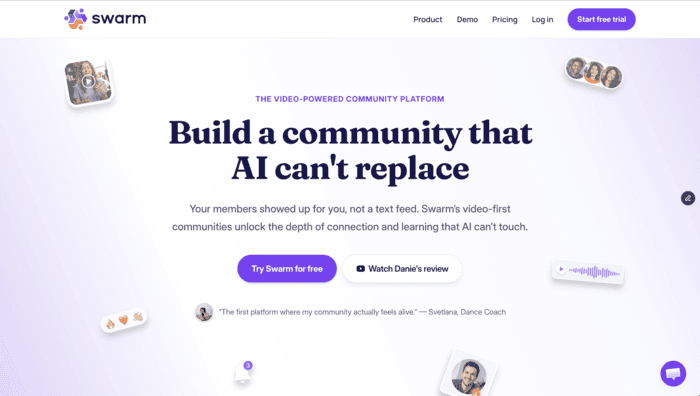
Swarm is a video-first community platform built for online experts & coaches who want to build communities that truly have depth and warmth - the real feeling of a community.
If you're tired of text-heavy platforms that lack engagement, with low course completion rates and a fragmented course-and-community experience, Swarm was built to solve that problem.
Video-first communities see 2-3x the engagement levels of traditional text-based communities, and this is backed by statistics.
By combining video teaching, peer learning and practice submissions (or in another words, homework), you can build courses that actually keep members moving - learning together and holding each other accountable.
One thing we focused on when creating the platform is a pricing model that serves creators at different stages of their journeys.
Our most basic plan is $29/ month (aka, less than a cup of coffee a day!) but comes with a 10% transaction fee- it's the perfect plan if you're just starting out or run a free community.
Once they get their first few members, the $89/month growth plan works better, since it immediately reduces transaction fees to 2% while still focusing on affordability.
As creators continue to grow, the $199/month plan includes a branded app, a white-label domain, Zapier, API, and SSO integrations.
Key Features
Our discussion focuses on customer retention and engagement. We want to help creators build communities that feel alive, so they automatically bring in referrals and recurring revenue.
These are the features we included that keep members engaged and coming back:
Threaded conversations: Text, video, voice notes, and screen shares can all live within the same thread.
AI summaries and the ability to reply with a video, a voice note, or a screen share.
1:1 messages and small group chats so creators can reach members in different ways depending on what needs to be communicated.
Discussions can be organized by topics. These hubs can be created for different aspects of your community.
Each hub can be customized with a different layout and can be changed at any time. The options include feed, video grid, or chat view.

Every post is auto‑transcribed, indexed, and summarized, allowing for any video, voice note, or post to be searched at any time.
AI helps you draft responses. You can then edit or post as-is.
Six role levels, channel-specific permissions, and per-post controls allow you to give moderators varying levels of access.
Courses are built with a focus on integrating courses and community so that the two are not separate entities but instead support each other.
The course builder has a drag-and-drop module creation approach that allows enforced lesson order.
Entire courses can be duplicated for different cohorts.
Members can submit videos for instructor feedback. This is great for communities that need creators to give feedback on specific exercises or practices, which is why a lot of our creators are focused on workouts, physical therapy, or music production.
Quizzes and certificates allow members and creators to judge where they are in their learning journey.
Members have access to completion and progress metrics.
Creators have insights like completion data that can easily be found in their admin dashboard.
Members can connect with each other and ask questions within the discussion hub that is integrated into every course.
Events like masterminds, workshops, and Q&As can be started with a simple click of a button. Members can join effortlessly through the Swarm platform itself.
Meeting mode is enabled for interactive sessions, and webinar mode for a broadcast.
Recording, transcription, and AI summaries allow members to come back to live recordings they might have missed.
All of the community events can be found in one calendar. Members can subscribe to receive updates, and time zones automatically update.
If you want to host a paid event, pricing options include standalone tickets, bundled offers, or the ability to include it in the membership.
If you would like to give public access to certain workshops or events, you can open a webinar, workshop, or podcast recording to anyone without the need to sign in with an account.
In-person events can also be included in the community calendar.
How much does Swarm really cost?

Pricing starts at $29/ month. This includes the ability to have 1000 members in your community, multi-tier memberships, unlimited video or voice messages, unlimited courses or events, and live streams with a maximum of 30 mins/session.
Best for
Podia creators who want to retain members and focus on building a community with a video-first approach.
Pros | Cons |
A strong focus on engagement tools like threaded conversations and multimedia replies | Transaction fees are competitive with most other platforms but still part of the costs. |
Customizable community structure | Strong set of features for courses but a community-first approach, so this platform tends to be best suited for creators where community is a priority. |
Comprehensive event management | Marketing features are not the main focus on Swarm. It is better suited to community-focused creators. |
Branded app available for a fraction of the price of other platforms (The Scale plan at $149/mo includes the branded plan) | |
AI features like searchable transcriptions and draft assistance | |
Swarm integrates community and course experiences while other platforms tend to keep the two separate. |
Trusted Reviews
"Outstanding Community and Support That Truly Empower creators"
What do you like best about Swarm?
Besides being a community, coaching, course platform that is one of a kind, the support and user community is outstanding. They walk their talk and have created a space for founders, creators, and more to collaborate, learn, grow, and support each other.
What do you dislike about Swarm?
There is little I don't like about Swarm. After trying many other products, there is nothing much to complain about. That being said, they make a lot of updates often, based on user experience and requests. If you don't want a product that grows alongside you, keeping up with updates may be frustrating. However, the communication and support with each update has made it easy for me to keep up, and I feel heard and supported as they try to meet the needs of as many users as they can.
"The Video-Powered Community Platform That Transforms Online Engagement"
What do you like best about Swarm?
- The unique 1:1 spaces feature enables personalized, asynchronous coaching - members only see their interactions with you, making it perfect for individual support
- Incredibly intuitive interface - participants find it easy to navigate without getting overwhelmed
- Video-first approach creates genuine connection while maintaining flexibility (no need for constant live presence)
- White label option with branded mobile apps (UK-based, which is great for European businesses)
- Integrated course module that seamlessly blends with the community experience
- Clean, professional design that doesn't sacrifice functionality
- After trying Facebook (declining engagement), Skool (group-only limitations), Mighty Networks and Circle (both too overwhelming), Swarm emerged as the clear winner by offering the perfect balance of features and simplicity
- Customer support is really quick and flexible.
What do you dislike about Swarm?
There is nothing really I do not like yet.
As a newer platform in the market, some advanced integrations might still be in development but they are very quick in responding to issues or queries.
And they recently launched a course feature which I am still testing, so still exploring its full capabilities so I haven't included that in my review
Mighty Networks: a better ‘all-in-one’ than Podia
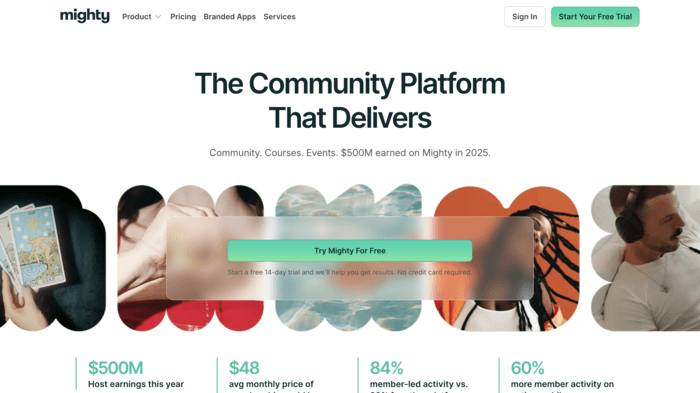
Podia tends to be pretty limited when it comes to its all-in-one selling point. If you are looking for more features but not for something specific, Mighty Networks could be the platform you should switch to.
It offers better course and community features than Podia.
Members can see what they have in common when they visit member profiles; badges and streaks are shown across profiles, profiles can easily chat with each other, and nudges are sent to inactive members. These are some of the features we found the most impressive, but the member page covers all the features in more depth.
What I did not like about Might Networks is how confusing some of their documentation was. The pricing page did not have clear transaction fees info, and did not break down the features available in each plan very well.
This is what it looked like when I was on the pricing plan page:
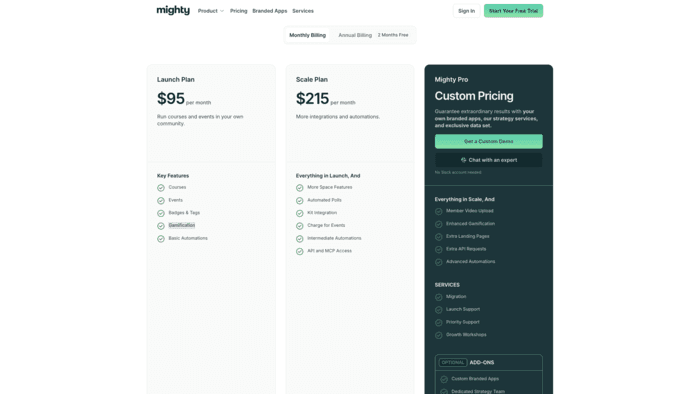
However, when you scroll down, there is a lower plan that is not seen in the table:
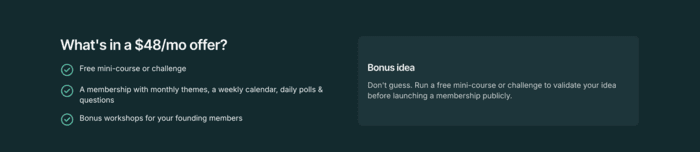
So, I created a free trial account, and when I went to billing within my account, it had clearer information on features and pricing:
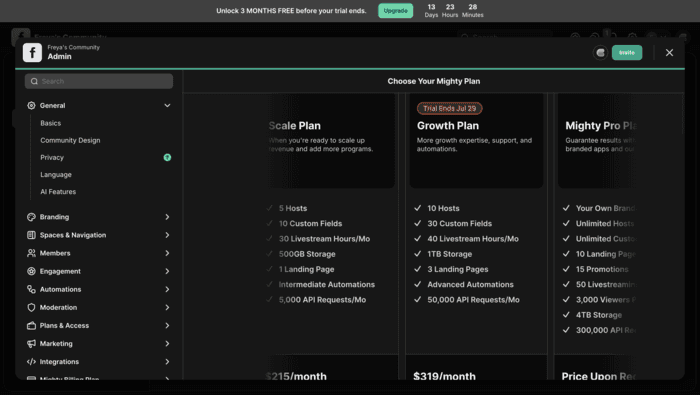
It felt purposely confusing, which I was not a fan of, and I had to jump through a few hoops to get the information I wanted.
Key Features

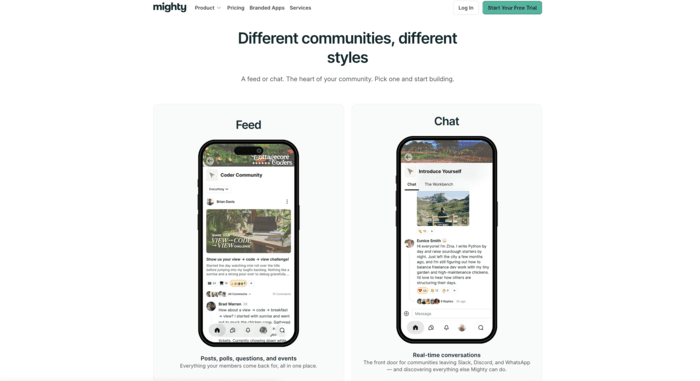
Mighty lets you pick between ‘Feed’ or ‘Chat’ depending on what kind of community you want to build. Posts, polls, questions, and events are what the feed option focuses on, while conversations are what the chat option focuses on.
Drip scheduling allows creators to unlock course modules gradually as members progress or on a specific schedule.
Member features like nudging members who have been inactive for a week, adding a badge for a member’s first post, or having custom fields like location and goals encourage member participation and community building.
How much does Mighty Networks really cost?
Pricing starts at $79/ month when billed monthly. This includes features like courses, events, gamification, and basic automations.
Best for
Best for creators who want Podia’s all-in-one selling point with better feature access.
Pros | Cons |
Top-rated mobile app | Transaction fees in every plan |
Excellent community and member features | Course creation abilities are limited |
Easy set-up | |
Offers great automation features |
Trusted Reviews
My experience on Mighty Networks has been extraordinary. I have never had a large platform that feel so personal. From the customer service to the C-Suite I feel like I have seen and heard. The product is extraordinary and it gets better everyday. I love how open they are to new ideas, and the ease of use is superb!
Mighty Networks was not only difficult…Mighty Networks was not only difficult to use, they hook you in through the little writing in the terms of service so that you are billed for services after you stop using them.
Circle: a Podia alternative for enterprises

Circle offers event and community features, and the ability to build courses, whilst seamlessly tying all of these together.
Creators can go live with events while also turning them into recordings for future access. Those events can be promoted to members with automations like countdowns, reminders, and notifications.
This ties into their courses and community, which includes the ability to create posts with video, audio, files, and embeds.
Creators can also create spaces based on topics, groups, or memberships with public, private, or paid access.
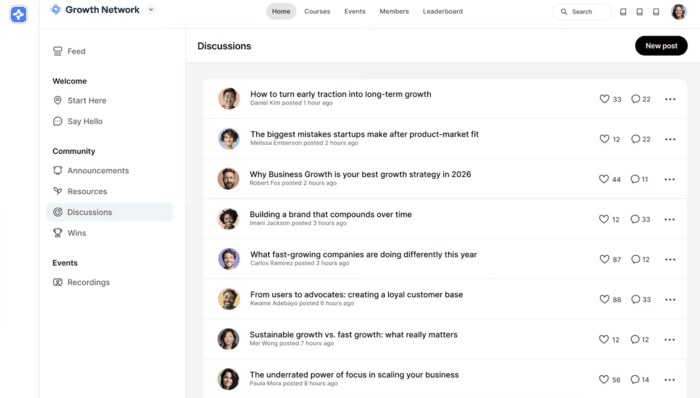
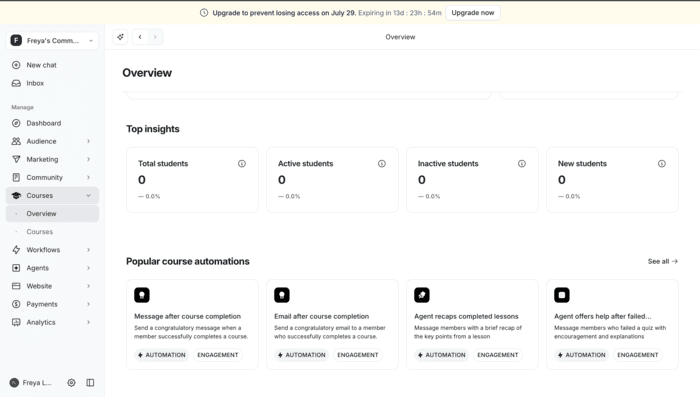
When I created an account, this is what I saw starting out on a free trial:
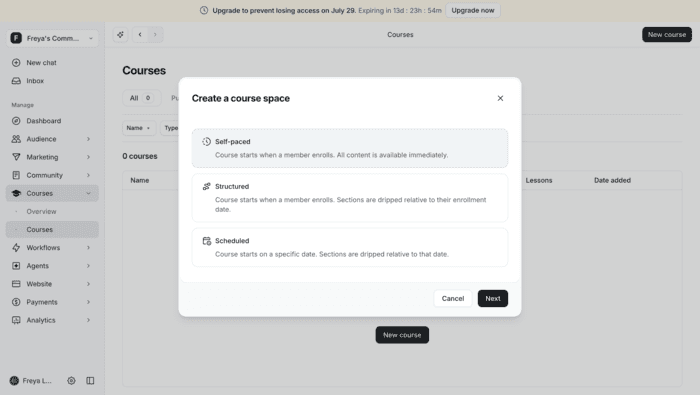
Course creation starts with a prompt asking creators whether the course will be self-paced, scheduled, or structured.
The downside I experienced and have heard is that Circle tends to be complicated to set up. Companies often hire external support to get the ball rolling, or it has to be delegated to a dedicated team member.
Key Features
Gamification allows creators to include points, ranks, and leaderboards for members.
Features include drip scheduling, quizzes and assignments, branded mobile apps, and different AI agents.
Flexible selling options include one-time payments, subscriptions and trials for members signing up.
Automation workflows include auto-responding to questions or posts, moderating content that goes against community regulations, or automatically organizing content.
How much does Circle really cost?
Circle only allows creators to pay for a whole year at a time. It has an $89/ month plan and a $199/ month plan. Besides this, larger enterprises can get custom quotes.
Best for
Podia creators who want AI workflows, more community features, and better monetization options.
Pros | Cons |
Ability to build a mobile app on iOS and Android | Features like email hub tend to have a separate cost and be an add-on |
Reporting and analytics features to help grow | Features like workflows or automation are hidden behind higher tiers |
Automation workflows | Steep learning curve due to complexity |
Customization for each community |
Trusted Reviews
"Great Tool but limited and dull workflow possibilities without external integration"
What do you like best about Circle?
My most favorite feature is that Circle allows to play around with Access Spaces and create your own little infrastructure within circle without having to depend on the integrated paywall system.
What do you dislike about Circle?
My most disliked issue is the workflow limitations, I feel like there is so much more possible, whole workflow sets that you could create, but all of it is just running based on ONE trigger only for ONE small thing, or Im using it wrong idk. And not only that then you pay around 2K annually just to get 20 workflows, like dude it's not even a proper "AI" feature, it doesn't use up tokens, just runs a task based on a predefined set of rules.
"Highly Engaged Community Builder with Room for Improvement"
What do you like best about Circle?
I use Circle to engage customers in a collaborative community setting. It allows me to provide extensive information, ongoing care, and communications, as well as schedule events like integration circles and communities. This approach has been very positive, supporting meaningful change. I appreciate the functionalities of paid memberships in Circle, which offer a great way to transition from free to freemium to premium while controlling access to certain community elements. I'm very happy with the decision to use Circle; it's a valuable tool for providing the greatest product to customers and is seen as a tremendous value add. Circle outshines alternatives like Mighty Networks and Discord, offering a better UI and more cohesive structure. I was particularly impressed with the easy customization and integration with external resources in my custom-designed customer portal. The initial setup was well guided, and Circle delivers an exceptional community platform experience, making it highly recommended.
Kajabi: an alternative for creators focused on courses but not community-building
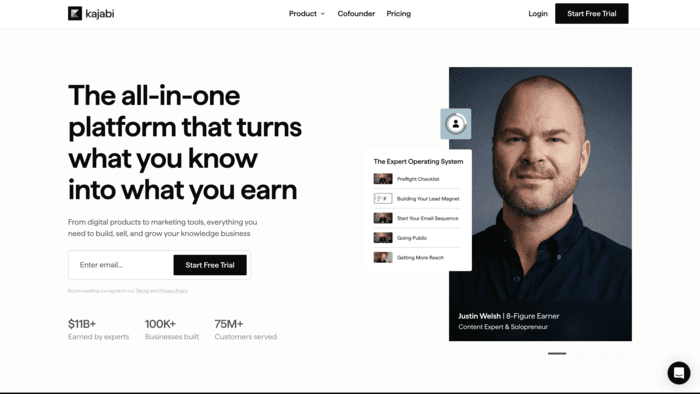
Kajabi creators often sell more than one product since the platform’s pricing is specifically geared towards multiple products.
Their lowest pricing model has the ability to sell 5 products, but it only has one community.
Creators can also start and host podcasts on Kajabi, which is a unique selling point compared to other course platforms.
Key Features
Drip content and scheduled releases allow creators to structure their courses depending on how they want content to be released to members.
Analytics allow creators to track progress and see completion insights for members.
Different monetization options like one-time payment, subscription, or a payment plan allow Kajabi creators to sell different products with different pricing models.
Order bumps, upsell options, coupons, and promotional offers give creators a lot of selling options.
How much does Kajabi really cost?
Monthly pricing starts at $179/ month with a 5-product limit. The growth plan is $249/month with a 50-product limit, and the Pro plan is $499/month with the ability to create unlimited products.
Best for
Podia creators who have multiple products to sell with a large focus on providing a strong course experience.
Pros | Cons |
Course creation is AI- assisted. | If you are a smaller creator, the pricing does not make sense. |
While designing, creators can custom code, but this is only available in the Pro plan. | The branded mobile app feature is available only on the highest pricing tier. Other platforms offer this feature in their base pricing models. |
24/7 chat support quickly eliminates any confusion. | Affiliate programs are only available in the Growth and Pro plans. |
Their new feature ‘Backstage’ is pretty cool. It allows creators to drip-feed a course at different stages to different members, enabling personalization for every client. | You need to put in credit card information when signing up for a free trial, which most other platforms we signed up for did not require us to do. |
Kajabi's MCP allows you to connect different AI tools directly. Creators can build pages or run promotions while still conversing with their preferred AI agent like Claude or Gemini. | Limited community features. |
Trusted Reviews
"Easy CRM Alternative with Room for Email Improvements"
What do you like best about Kajabi?
I think Kajabi is pretty easy to use overall, which is great. I like the templates we can use for emails, as they are easy to set up and others can use them too. It's nice to have the downloads and freebies that Kajabi offers. Also, even though we can't afford a big CRM, Kajabi works well for us in handling contacts. The initial setup was pretty easy with not much to do, which I appreciated.
What do you dislike about Kajabi?
I think the templates for emails could be a little easier to work with and a little easier to save. Sometimes there are different versions of emails that are not compatible with each other, and I think some of that can kinda get confusing for other people to use.
"All-in-One, but Limited Automations, Funnels, and Tagging"
What do you like best about Kajabi?
I initially liked that it had all the website tools, email service, and course delivery in place.
What do you dislike about Kajabi?
The quality of these tools was so limiting. I get frustrated with the automations and ability to create funnels; I was limited to only 100 tags for contacts. The web design was blocky. (It has improved)
Thinkific: a course-focused platform
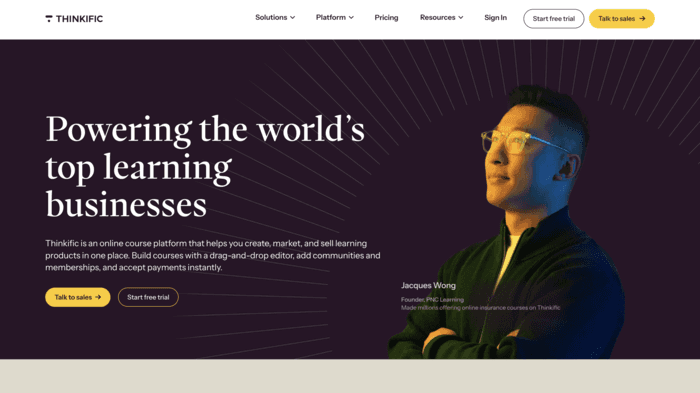
Thinkific is a great platform for creators who are hyper-focused on courses.
The platform allows creators to create unlimited courses with videos, text, and quizzes. You can also sell supporting digital products like ebooks or templates.
Key Features
Analytics include cart abandonment, revenue, enrolments, and completion in one dashboard.
AI-powered content creation is an option.
The start plan and grow plan include an HTML and CSS editor, giving creators greater design access.
The start plan and the grow plan allow creators to send members completion certificates.
How much does Thinkific really cost?
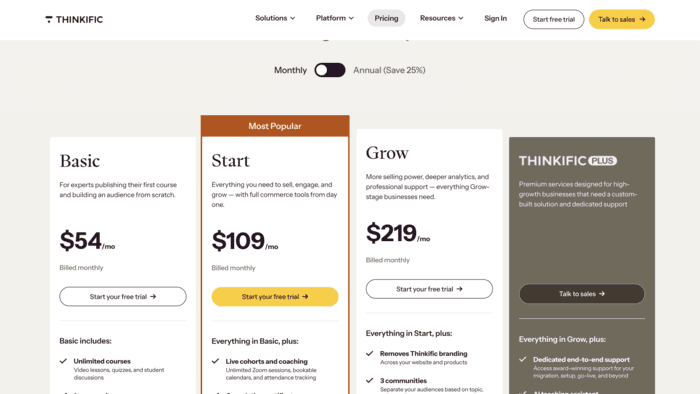
Billed monthly, the basic plan starts at $54/month and includes unlimited courses, the ability to sell digital products, sales dashboards, and one community.
Best for
Podia creators who want to level up but are still focused on creating mostly courses and a few digital products.
Pros | Cons |
SCORM-compliant LMS | No native email marketing feature |
Unlimited courses included in every plan. | Custom coding and multiple features can lead to a steeper learning curve |
0% transaction fees if you use their native Thinkific payment platform. | Community building is offered, but the features are limited compared to other platforms |
Automatic tax collection and remittance for U.S. and Canadian creators. | |
Analytics in every plan that allow creators to track learner progress, engagement, and revenue with built-in reports. |
Trusted Reviews
"Robust, Time-Saving Platform for Building an Educational Business"
What do you like best about Thinkific?
Over the years, Thinkific has expanded and evolved into a more robust, education-oriented platform that facilitates the development of an educational business. I rarely, if ever, encounter issues when utilizing this platform. The integrated AI feature for constructing landing pages has significantly conserved time and eliminated uncertainties associated with adhering to the latest best practices in copywriting. The pricing structure is reasonable; however, I would prefer the AI Agent to be included in the Grow plan, as it would assist in advancing my capabilities to a level that would enable me to afford the Plus program. Zoom Integrations have been instrumental in running weekly workshops and setting up private office hours. In over 5 years, the platform has never crashed or caused technical issues for my students.
What do you dislike about Thinkific?
At the moment, my main concern is that, as a small business, I can’t use the AI Agent because it’s only available to Plus members. I think it would be helpful if the developers reconsidered making this feature accessible to lower-tier members as well, especially for those of us who have maintained our membership for several years.
"I have been using it for about 3 years. Very disappointed."
What do you like best about Thinkific?
There are really not so many things I like about this platform. It works and has a little downtime.
What do you dislike about Thinkific?
I even don't know where to start... :) The user experience is terrible—it's slow and unintuitive.
The tools available for B2B sales are very limited, especially for EU-based companies. The features that do exist for B2B Sales often don't work properly or feel unfinished.
The way user roles are set up is poorly designed. For example, if I want someone to only add or remove subtitles on my lessons, I have to grant them the 'ADMIN' role just for that small task, which is absurd. The worst part is that admins can access your financial data. There's a checkbox labeled 'Hide financial Data for Admins,' but it only hides the accumulated revenue reports. Admins can still access 'Orders' and 'Transactions,' making that checkbox practically useless, since an admin could just take screenshots and quickly get a summary using any LLM.
Recently, they launched email marketing tools, but the only customization options for your emails are basic formatting like bold or italic text—nothing more. Why not allow instructors to provide their own email HTML so I could import templates from Mailchimp or design my own emails? These are just a few of the issues that immediately come to mind & I am not talking about player bugs my students always experience.
Teachable: the easy, conventional option
Teachable is one of the first platforms creators test because it is one of the oldest and most well-known options.
It also has multiple products included in each plan, as Thinkific does.
Their global payments and taxes feature allows users to calculate US sales tax, EU VAT, and Canadian GST.
While it does not have some of the features that other platforms do, it is considered one of the most dependable options for creators to select, with some stand-out marketing features like the ability to build sales pages, affiliate programs, and include upsells.
Key Features
Course certificates are included in all plans.
The Teachable ‘create with AI’ feature allows you to automatically create quizzes for your courses.
Order bumps, upsells, student referrals, and abandoned cart emails.
Students can download the Teachable app, but there is currently no option to create a white-label app of your own.
The native Teachable payments processor allows for 0% transaction fees for all plans except the cheapest ‘Starter’ plan, which includes a 7.5% transaction fee.
How much does Teachable really cost?
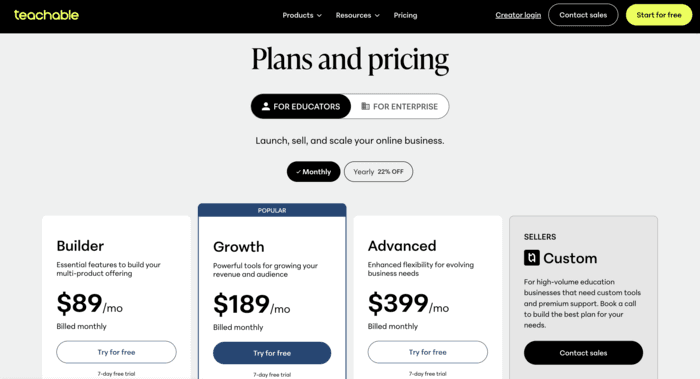
Teachable starts at $39/month when you pay monthly and goes up to $399/month for the Advanced plan. The only option higher than that is the custom plan.
The basic starter plan includes 5 products, but it does include the 7.5% transaction fee. So, the moment creators get their first few members, upgrading becomes more financially sensible.
Best for
Podia users who are focused on growth and want more marketing features but are still focused on courses exclusively.
Pros | Cons |
Native iOS and Android apps available in all plans. | As one of the first course platforms, Teachable is functional in every way but has limitations. It does not have the gamification features that have become pretty standard among other platforms. |
The marketing stack is robust and well-maintained. | Teachable’s payment processor offers 0% transaction fees on the growth plan and higher, but its payout schedule follows Teachable’s own. |
The value for money is there for creators who are just getting started. | Integrations with email platforms are limited, and beyond a few standard options, you need to use a platform like Zapier. |
Trusted Reviews
"Easy Course Creation and Selling with Continually Improving Features"
What do you like best about Teachable?
We've been on the platform since 2020. Overall, it's an easy way to create and sell courses and I appreciate that they've continued to add features that help creators grow. The price is comparable to other LMSs and overall performance for clients is pretty good.
What do you dislike about Teachable?
Support is not necessarily the best and they need a lot of context in order to help you. They're always trying to add AI features that don't really help creators because, in the end, they don't know what courses you're building.
"Would not recommend Teachable"
What do you like best about Teachable?
It was an easy to use platform for hosting courses.
What do you dislike about Teachable?
It didn't include enough features and they recently got rid of their lowest priced tier and raised the prices of the rest.
Skool- best for creators on a budget
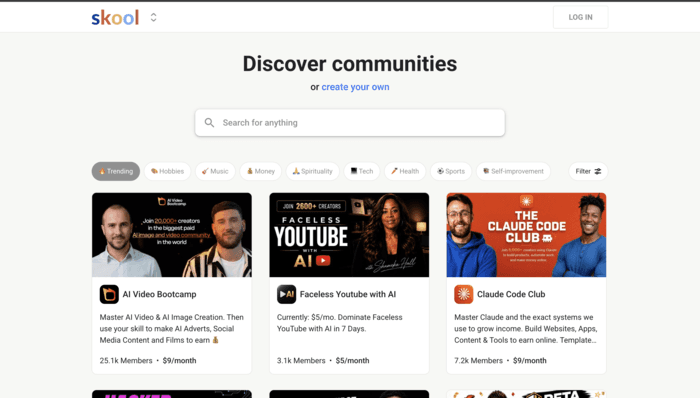
Skool’s pricing and platform are simple and easy to understand. Their basic plan is $9/ month but comes with limitations. It does come with some gamification features like leaderboards and a point system, but there is also a hefty 10% transaction fee.
I have personally seen it work best for brands that host a community alongside a product or service offered elsewhere.
The basic plan allows for unlimited members, courses, videos, and live calls. So, I often see brands use their own payment processing system but use Skool to host the course itself.
Key Features
A cheap starting point at $9/ month
The higher $99 plan includes a custom domain, affiliates feature, and a lower 2.9% transaction fee.
Communities can be discovered by prospective members on the Skool platform. This can help with organic growth.
How much does Skool really cost?
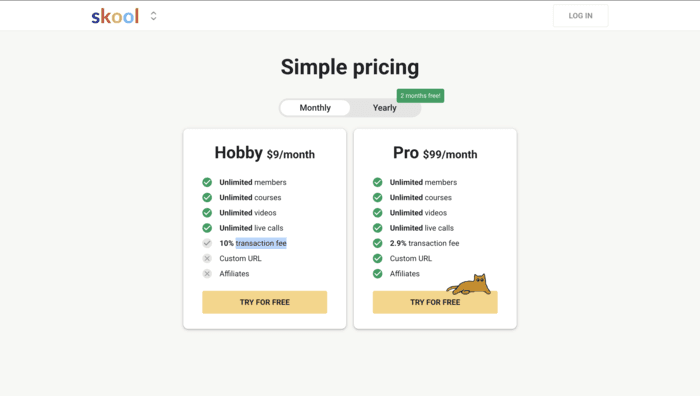
The ‘Hobby’ plan is $ 9/month, and the Pro plan is $99/month with a few extra features, such as a custom domain and the ability to enable affiliate marketing.
The main difference between the two is the 10% transaction fee versus the 2.9% fee for the Pro plan, which accounts for the $90 price increase.
Best for
Podia users who want to pivot to a simpler platform with a few solid community features.
Pros | Cons |
Simple pricing and set-up | Limited features and limited growth |
Strong gamification features for a hard-to-beat price | Limited marketing features beyond the affiliate program in the higher plan |
Affiliate program in the Pro plan | Limited course features |
Unlimited community members | |
Live streaming |
Trusted Reviews
While we could not find Skool reviews on G2 or Trustpilot, we have cited reviews from YouTube and other websites that have reviewed the platform.
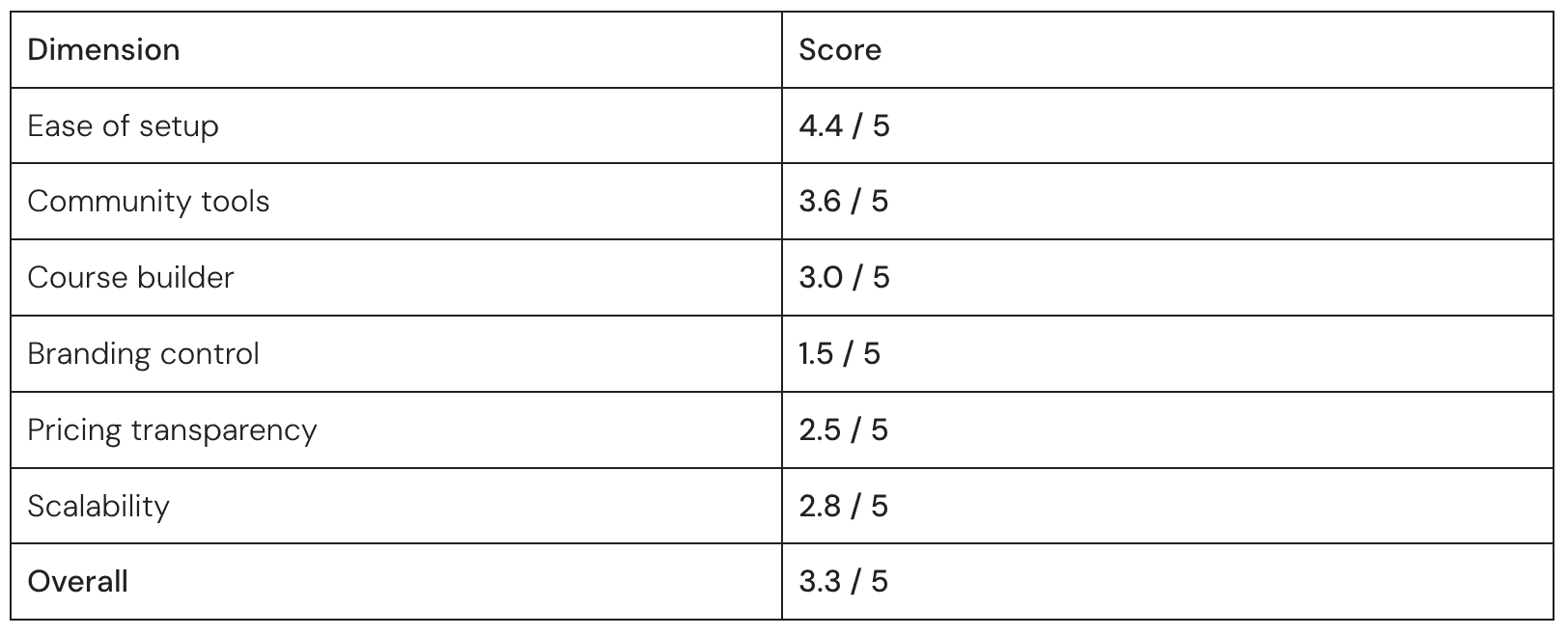
GroupApp reviewed Skool and gave it an overall rating of 3.3 / 5. This has been further broken down in the image below.
Reddit reviews are mixed, with users highlighting their gamification features but pointing out their basic course tools. Some users also mentioned the ‘forced gamification ’, which means users have to comment on posts to unlock content they have already paid for.
Other subreddits say most of the groups on Skool lead to ‘make money online quick’ courses, which might not be the best company to associate with.
FAQs
What is the cheapest alternative to Podia?
The cheapest alternative to Podia would be Skool, starting at $9/month. However, it should be noted that this option comes with limited features and a 10% transaction fee.
Does Podia have a native mobile app?
Podia is mobile-friendly, and communities can be accessed on browsers when using mobile, but it does not support dedicated iOS or Android apps. Most other alternatives on our list do support this feature.

