Community Platforms
7 Best Mighty Networks Alternatives to Consider: User-Reviewed
We have reviewed the seven most discussed alternatives to Mighty Networks and compared how their course hosting, community features, monetization, and marketing tools match up.

Mighty Networks, much like a platform like Podia, focuses on selling itself as an all-in-one platform. However, while both platforms position themselves as being all-in-one platforms, they have different priorities.
Podia takes a digital products-first approach, so its standout features help creators and coaches host webinars, sell digital products, create memberships, or sell coaching programs. Community is supplementary rather than the core focus.
Mighty Networks, on the other hand, prioritizes community features. Feeds, spaces, and member directories are features created to foster connection within the community.
In contrast to both of these platforms, Swarm takes a video-first community approach, with courses built into that community ecosystem.
With multiple platforms serving different creators better depending on what kind of community they are focused on creating, understanding the options available to you is an important first step.
What does Mighty Networks offer coaches and creators?
Mighty Networks positions itself as an all-in-one solution for creators who want to focus on community. With that in mind, here are some features that Mighty Networks offers that help you evaluate the platform for your own needs.

Spaces Architecture: The platform allows you to build different spaces for different purposes. So a space can be dedicated to a specific cohort, topic, or content idea. Each space is further customizable with its own feed, events, courses, and chats. This allows a coach or creator to run multiple groups or discussions within one platform.
Native Livestreaming & Video: Video uploading and livestreaming can be handled within the platform itself instead of needing platforms like Zoom or a separate platform to host video elements.
Member Networking: Personalized activity feeds, member profiles with their own intro questions depending on the profile, group chats, and location-based member directories allow for enhanced peer learning and community building.
Flexible Monetization & Bundling: Coaches or creators can sell courses through one-time payments, memberships, or subscriptions depending on preference. They can also bundle any combination of courses, events, and spaces together in any currency they choose.
Cohort-Based Courses: Students can leave comments in different sections of a course, ask questions in appropriate channels, and have group discussions with the aim of going beyond simply consuming content.
Which creators are looking for Mighty Networks alternatives?
While Mighty Networks works well for some creators, others look for alternatives when they encounter certain drawbacks.
Learning curve for community members: While the community elements and features are Mighty Networks’ strengths, they can also create an overwhelming interface for members to get used to. Navigating different spaces, feeds, and settings requires significant onboarding help for less tech-savvy members and, more importantly, may not always be necessary.
Jump to higher-tier plans: As your community or brand grows, so will your needs from the platform. If you need a feature like native livestreaming, for example, a higher-tier plan is necessary, and the jump in pricing is not insignificant.
Rigid customization options in basic tiers: The layout for your feeds, spaces, and profiles is relatively fixed and locked into the Mighty Networks’ ecosystem. Similar to our last point, if you want a custom mobile app, a higher pricing tier is required.
Lack of sophisticated LMS features: More sophisticated LMS features like advanced grading systems, dynamic learning paths, or mandatory assignment uploads are lacking in the Mighty ecosystem.
Text-based platform: Since Mighty Networks is built around text posts and discussions, it limits the depth of connection and engagement the platform can facilitate. Creators tired of text-heavy platforms or low engagement may want a platform that supports higher engagement and deeper connection, such as a video-first community platform.
How do you choose the right Mighty Networks alternative for your journey?
Pricing, features, drawbacks, and above all, personal preference, will dictate what platform is right for you. We have tried our best to collate some data across different platform options to help you make that decision.
Note: Pricing below reflects monthly billing. Most platforms offer a discount if you pay for a year at a time. Some platforms only allow annual billing, which tends to be restrictive.
Platform | Highlights | Pricing for the base plan | Transaction Fees | |
Mighty Networks creators and coaches who want to focus on building engaged communities through video-first connection and community-led learning. | $29/month | 5%, 0%, and 0 % on Launch, Growth, & Scale plans respectively | ||
Higher Logic is a good choice for B2B communities, capable of supporting teams of over 500 people and beyond. | Booking a custom demo is needed for exact pricing | Not applicable | ||
LearnDash is a good option for solo instructors, L&D teams, and institutions who want an LMS-focused platform rather than a community platform. | $259 /year | No transaction fees. Standard merchant processing fees through third-party payment gateways. | ||
Gurucan is for creators & educators who want a mobile-optimized course experience and are not looking for strong community features. | $99/ month | No transaction fees. Standard merchant processing fees through third-party payment gateways. | ||
A Mighty Networks alternative focused on digital products, including newsletters and podcasts, rather than community. | $179/mo | 0% platform commission beyond standard payment processing fees. | ||
HighLevel works well for business owners who want an all-in-one business tool, with sales pipelines and lead generation features, and don't mind limited community features. | $97/ month | 0% transaction fees beyond standard payment processing fees. | ||
Teachable is the standard and dependable course builder for solo creators or small teams who prioritize tax compliance tools. | $39/ month | 7.5% transaction fee when on the ‘Starter’ plan. 0% transaction fees for all higher-tier plans. |
Swarm: a video-first alternative designed for connection and community-led learning

Swarm’s primary goal is to be a video-first community focused on depth and quality rather than solely on metrics like comments and likes.
Members can interact primarily via video, although text and voice options are also available. Seeing a person on camera - their face, their body language, their tone of voice - creates a depth of connection that text-first platforms like Mighty Networks simply can't replicate.
At Swarm, we have consistently seen higher engagement rates and, more importantly, happier members when we have focused on creating a video-first community platform. This is backed by statistics like the fact that real-time engagement with livestreams draws in 26.8% of all internet users.
Swarm focuses on providing a video option for any interaction. This is done through video replies; videos can be embedded in a conversation thread, or custom videos can be sent to a community member to explain a concept.
Pricing

Pricing starts at $29 for the basic plan (when billed monthly). This includes 1000 members' capacity, the ability to create one space, unlimited video and voice messages, unlimited courses and events, multi-tier memberships, and a branded digital store.
The drawbacks of this pricing tier are a 10% transaction fee and live streams capped at 30 minutes per session. Both can be overcome at the $89/month tier, which offers a 2% transaction fee and no time limit on livestream recordings.
Our goal with pricing was to create a basic tier that can help a creator or coach grow their community. After they have a healthy number of members, moving to the higher plan with a lower transaction fee makes more sense.
Key Features
Threaded conversations: The focus on peer recognition is seen in threaded conversations, within which text, video, screen share, or images can live irrespective of which thread the user wants to add to.
Customizable hubs: Each hub is customizable to its purpose with different layout options. This includes a video feed, feed, or chat view.
AI summaries: AI summaries of all videos, including live streams, along with the ability to reply with a video, a voice note, or a screen share, enhance community connectivity.
Course builder: The Swarm course builder is a drag-and-drop interface that allows creators to create modules and enforce a specific lesson order.
Community calendar: The community calendar allows members to stay informed on livestreams, in-person events, webinars, and more. It adjusts to time zones automatically, and notifications can be further customized.
Ideal for
Users mention Swarm as especially beneficial for coaches and creators helping members in spaces like music, fitness, and personal development. The main benefit we see is how members can connect with coaches across multiple mediums like video, screen sharing, or text.
For example, Ronald Ead helps individuals struggling with airway and jaw health issues. This space needs consistent feedback, often best delivered through video.
Pros | Cons |
A focus on coaches and creators who want higher engagement through multiple tools like multimedia responses and threaded conversations. | Transaction fees, while remaining competitive with other platforms, need to be accounted for by creators or coaches. |
Higher course completion rates thanks to an integrated course and community experience, where discussion hubs are integrated into course modules, and members can submit homework for review. | Since we live in a text-based internet ecosystem, some members confront camera shyness or simply a habit change when moving to livestreams or videos. |
Events like livestreams, masterminds, Q&As, and workshops are natively built into the Swarm ecosystem. | |
Consolidation of your tech stack since Swarm handles courses, monetization, membership, event tickets, booking, and more within one platform. |
Users say
I switched my paid community from…
I switched my paid community from another platform to Swarm, it has been the best! My members love the new space. It makes my life so much easier.
The #1 Community and Course Building Platform is HERE!
I was in search of a SAAS platform for my parenting training business that seemed like a unicorn. I tried several, all checking some of the boxes, but never all (and some checked few boxes). Then I stumbled upon Swarm. Instead of being a unicorn, Swarm is the pot of gold at the end of the rainbow. It is truly the jackpot of solutions for anyone looking to build community with real human connection. If you are looking for a course builder, native virtual meeting options, branding and white labeling options, a storefront, direct messaging, and the amazing video-centric options, there is truly no other SAAS that matches Swarm. Not only is the product great, but Swarm has THE BEST support team possible, along with an amazing community of other creators and providers. And all for a price point that is competitive with other platforms available. Stop wasting your time and energy with complicated CRM-based communities or course builders that added a community as an after though and build a service that will separate you from all of your competitors. And if you do join Swarm and their community, reach out and introduce yourself and say hi! We love meeting and supporting our new Swarm creators with all of our endeavors!
Higher Logic: an enterprise-grade and community-focused alternative

Higher Logic works differently from Mighty Networks in two key ways, if we had to summarize this succinctly:
It is targeting far bigger enterprises than Mighty Networks. This is reflected in the fact that pricing is only available after a demo. It is built for institutional scale- corporate enterprise networks and non-profit organizations, for example.
And second, Higher Logic works and operates as a connected ecosystem designed to plug-and-play enterprise-grade Association Management Systems (AMS) and CRMs such as HubSpot and NetForum.
Pricing
Since pricing is provided after a demo, we don't have specific figures. However, for smaller creators and coaches, this is not the platform to host your community on.
This option is meant for the decision-makers at corporate enterprise networks focused on consumer goods, financial services, or media.
What we gleaned from reviews online is that it starts at a minimum of $24,000 per year, which should reflect the scale at which it operates. We also noticed it being adopted by organizations with over 500 employees at minimum.
Key Features
Unlike Mighty Networks, which is focused on creator monetization, Higher Logic’s ethos is centered on data security, complex member directories, and aligning with institutional hierarchies.
Features are built around member lifecycle automation, secure credential verification, and high-volume forum structures. The goal is to handle hundreds, if not thousands, of active professional users.
The platform’s third-party integration systems are advanced and far-reaching across multiple software categories.
Ideal for
Pros | Cons |
This robust platform can handle formal sales cycles, custom setup, and dedicated customer success management at scale. | The high cost keeps smaller organizations from considering it. |
Sophisticated behavioral triggers automate onboarding sequences and engagement mechanisms, while also providing important data to present to stakeholders. | A steep learning curve even for large organizations, along with complex backend systems and ongoing management costs alongside a heavy annual price. |
Deep reporting dashboards allow the organization to map community engagement and connect the data to metrics like retention, support deflection, and overall member lifetime value. | Higher Logic is built for larger organizations, not solopreneur communities. |
Users say
Very robust and customizable for different needs.
I used it to manage three different Forums; our customer community, feedback/product ideas forum, and private ambassador forum (for customer advocates).
Pros:
They are always open to hearing customer feedback and making necessary updates to their product with it. Our Customer Success Manager was always available to help us with both our strategy and any tech issues or questions.
Cons:
Some of the themes are a bit outdated and could use some more modern UX/UI. It also lacks integrations with CRM tools like Salesforce, but at least integrates with things like Zendesk, Hootsuite, etc.
Simplicity at it's best
We moved to Higher Logic Vanilla from our previous vendor not too long ago and the experience has been positive so far. The community, blog, forums, and discussion boards work as expected and the administration team seems to be happier than before.
Pros:
It's a simple and user-friendly online community software that can easily meet your business needs if you are looking to bring your customers into one place and allow them to collaborate. Gives the ability to build multiple forums, user groups, and discussion boards for different product lines. The best part is that it's a very easily configurable system to create various sections/categories, and membership settings to build a beautiful customer community for collaboration purposes. The application is very responsive and comes with good documentation.
Cons:
There is not much to like least about this software. Our administrator says that you cannot schedule posts, but I am not sure if that is the case anymore.
LearnDash by LiquidWeb: an LMS-focused alternative for solopreneurs and smaller teams

LearnDash is targeted towards smaller teams or solopreneurs who are just starting out and want a more LMS-focused platform. If you are more focused on creating courses and less on community, this platform has some great beginner-friendly course features.
If you already use WordPress to host your website, this is a good option since you can easily add the LearnDash plugin.
The benefit? You own your data, every line of code, and the general server environment. You can easily customize the layout and integrate other WordPress plugins, like WooCommerce or Elementor.
The focus is on creating robust courses that can live within your WordPress website.
Pricing
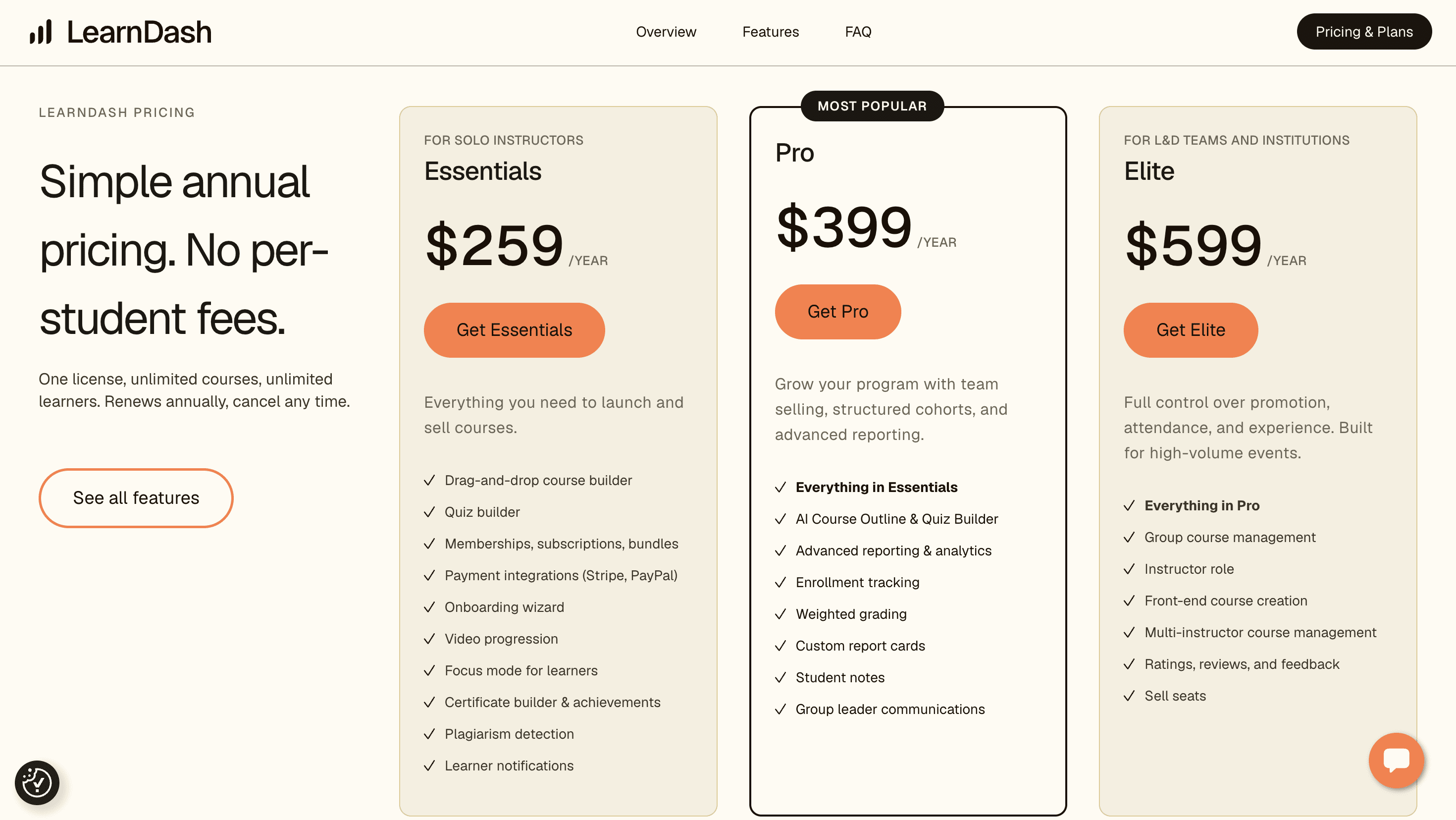
Starting at $259/year (averaging around $22/month), this is an affordable option with plenty of customization.
The ‘Essentials’ plan includes a drag-and-drop course builder, a quiz builder, monetization options (memberships, subscriptions, bundles), and payment integrations, alongside specific learner features.

Key Features
WordPress-friendly: Most platforms work on the idea of you renting space in a proprietary ecosystem. However, if you already own a website and know your way around server updates and security issues, this plugin option is worth considering.
Structured education: Structured video delivery, certificates, and compliance tracking demonstrate the focus on being an LMS system first and foremost.
Focus Mode: A learning-focused interface that gets rid of standard footers and site navigation to encourage students to focus on learning material.
ProPanel & Detailed Analytics: Analytics gather data showing real-time enrollment numbers, quiz performance, and course completion rates, among other metrics.
Group Management & Seat Licensing: Group management allows large organizations to have multiple team members who handle their own groups in a silo without unnecessary intervention.
Advanced Quiz & Assessment Engine: LearnDash supports eight different question types such as multiple choice, fill-in-the-blank, essay, sorting, and matrix matching. This works alongside features like timed tests, hints, randomized questions, and custom grading rubrics.
Ideal for
Pros | Cons |
Absolute data ownership and control are possible through the plugin, which is not possible when you ‘rent’ a space when using another ecosystem. | While the LMS features are robust, it lacks a community focus, which can only be added through separate plugins like bbPress. |
A flat annual fee encompasses unlimited courses and unlimited students. | On the flip side, since it is hosted on your own site, technical maintenance and oversight fall on your shoulders. |
Tools like multi-tiered quizzes, conditional branching logic, and video progression unlock sophisticated LMS capabilities. | |
Group management features allow for external group leaders to handle their own teams without unnecessary oversight. |
Users say
A-plus service experience
A-plus responsiveness, detail and helpfulness. Very patient with a new user. Understood my issue perfectly. Shane T was my service assistant and he did great. His follow up email even provided more answers and reasons for my problem. Great job!!
Extreme Efficiency for Corporate Assistance
We had a couple issues with new updates. The process getting in touch with someone was a little difficult as companies have adopted AI chatbots for more efficiency.
Once I acquired the customer service email, I got almost an immediate response from Dayana. She answered me within 24 hours, and fixed the two issues within 48 hours! We are a business, so it is important we get issues fixed immediately as it can hinder our brand voice.
Then, there was ANOTHER issue! I reached back out to Dayana, who solved the problem AGAIN quickly and efficiently. I am incredibly pleased with the support I received and love the website template I use on our WordPress platform.
Thank you, team!
Gurucan: a mobile-first alternative for creators & educators

Gurucan positions itself as a mobile-first course hosting platform. It gives creators and coaches native white-label mobile apps at a hard-to-beat price point.
Self-paced learning structures that are mobile-optimized make the ideal use cases for Gurucan quite different from Mighty Networks. Self-paced educators who want straightforward video course capabilities with zero transaction fees can consider Gurucan.
Cohort-based course creators are better suited to a platform like Swarm or Mighty Networks.
Pricing

Starting with a 14-day free trial, the base plan (‘Expert’) is $99/ month or $990/ year when paid annually.
It includes 5 products, one admin user, the branded web app, custom domain, integration capabilities, and, significantly, an onboarding call.
Signing up requires card details, and once you start your free trial, this is your first look at the inside of the platform:

Key Features
Marketing automation: Beyond traditional email newsletters, creators can send out mobile notifications and automated email campaigns.

Flexible Memberships & Digital Products: Options include multi-tiered membership subscriptions, one-time course sales, bundles, and digital downloads- all with no transaction fees.

CRM & Analytics: Student progress, engagement metrics, and performance can be tracked through the analytics dashboard.
Ideal for
Pros | Cons |
Zero transaction fees are a rarity and worth being right at the top of the list of pros. | The page builder, layout options, and templates are relatively restrictive in comparison to alternatives. |
A mobile-first experience and approach is engineered with members who are always on-the-go in mind. | Fewer third-party integrations in comparison to industry giants like Kajabi. |
Secure video streaming is helpful to deter unauthorized downloading and screen recording. | While Gurucan has a membership feature, it isn't positioned as a community-focused platform and is limited in its community-building capabilities. |
An affordable option for creators for whom having a native mobile app is a non-negotiable. |
Users say
Gurucan takes my courses on mobile
I was amazed how easy it is to publish my courses online with Gurucan. Almost zero technical learning curve and amazingly responsive support.
Pros:
I love that my students can use a dedicated mobile app to access my courses.
Cons:
I wish Gurucan had more integrations with other software I use and I would like the marketing automations to be more flexible with more triggers and actions.
Reasons for choosing Gurucan
Much cheaper, easier to setup, less convoluted
Reasons for switching to Gurucan
The previous LMS solution I was using was wordpress based, had too many complex features I didn't really need and had a complex process to setup and operate.
LOVE the wide space they gave to the content, more room for improvement
Good, very easy to set up. Just some room for improvement.
Pros:
I love the wide space that is given to the content and the sidebar. It looks very good when you view it and gives complete focus to the content. It's very straightforward to set up.
Cons:
This software holds a lot of promise, but the first thing I would love to see is scripts being allowed to be implemented. I'd love to insert in my own homework form, my own audio player, my own buttons, etc. I'm afraid I'm too picky for generic buttons or players, I want my course to look as seamless and beautiful as possible. The upload of the images seems to be a huge oversight, it expands across the whole page no matter what size it is initially, and I had to insert the HTML code of my images instead, hosted by my own site. The app isn't too useful for me, it's yet another app to download and I prefer that my clients just click a url and go. Additionally, the way the chapters and lessons are laid out could be better, I dislike the black overlay over the cover photos that is currently the unchangeable default, my course is colourful and I'd like to represent that in the cover photos.
Reasons for switching to Gurucan
Invanto is going downhill and they charged me twice where they shouldn't have charged. I needed to get out quickly and Gurucan does the job well.
Kajabi: a heavy-duty, digital products-focused alternative to Mighty

Kajabi’s target audience is mostly creators and solopreneurs who want a platform with multiple features as their business grows.
Complex sales funnels, email marketing campaigns, and digital product storefronts are housed underneath one enterprise-level dashboard.
On the other hand, Mighty Networks works better for creators prioritizing cohort-based learning and member-to-member interactions.
Pricing

Pricing starts at $179/month or $143/month when paid annually, giving creators or coaches a 20% discount for signing up for an annual plan.
This ‘Basic’ tier offers creators 5 products, up to 2500 contacts, one website, one community, and 2 admin users, along with other sales, marketing, and brand management features.

Key Features

Visual website and landing page builder: A complete content management system allows you to design multiple pages for your website, including customized landing pages that are mobile-responsive and SEO/ AEO-friendly.
Multiple product variations under one roof: Digital products, memberships, 1:1 or group coaching, online courses, newsletters, and podcast episodes can all be hosted within the Kajabi ecosystem, allowing for scalability when growing a business.
Native checkout and payments: Stripe, PayPal, and digital wallets (like Apple Pay and Google Pay) can be used to process one-time payments, recurring subscriptions, payment plans, or free trials with zero platform transaction fees (only the fees that these platforms would charge you even if you use them natively).
AI-powered creator studio: Generative AI tools can be used to create rough first drafts for course outlines, landing page copy, or quiz questions. This can be done within the workflow dashboard.

Kajabi Backstage: The new Backstage feature allows creators to personalize the member journey based on individual goals. Each client logs into their own personalized space. The assignments, chats, and live sessions can be found within that space. Creators can drop a specific lesson into a client’s path, enabling journey personalization.

Ideal for
Kajabi works for creators and coaches with a heavy focus on digital products and marketing funnels. Kajabi offers better email marketing features, sales sequences, and landing page optimizations than Mighty Networks.
Coaches who prioritize those features should consider Kajabi.
Pros | Cons |
Kajabi serves as an all-in-one business suite with website building, customized landing pages, sales pipelines, email marketing, video hosting, and course delivery. | Starting at $179/ month, cheaper options are available to creators and coaches with similar features. |
Pre-built and custom multi-step marketing funnels can guide prospects from a free opt-in to future upsells and checkout. | Being an all-in-one option means migration of data and lists becomes a complex process. |
Podcasts, digital downloads, courses, and other products are delivered professionally under one platform’s roof. | |
Stripe and PayPal are built-in to the platform and can process complex pricing models like subscriptions or payment plans. |
Users say
I love my kajabi
I love Kajabi because of the All In One opportuniy to run my business. I prefer the smooth automations as it pertains to handling client appointments, sales, and community. The pricing is not feasible at times if you want to utilize what you truly need, and as a Coach certain features that are needed are add ons. I go back and forth with finding another patform that is all in one, but more affordable, but I can't let go of the Business at my fingertips. Customer Service has always been good at communicating when I have had an issue, and the added features of AI to suggest changes in your business is a plus. Although I wish with as many people that use Kajabi the prices would go down, I am going to hold on a little while longer.
Kajabi has been a critical resource for my business
Kajabi has been a critical resource for getting my online business up and running. They have held multiple online and live events that have been very helpful in advancing my use of the product.
HighLevel: a sales-focused solopreneur alternative

HighLevel (or GoHighLevel) targets smaller creators who are just starting out. HighLevel's primary goal is capturing new leads, which aligns with a creator’s goal when they are just beginning to build a community.
The platform allows creators and coaches to guide these prospects through a complex sales funnel that can involve multiple channels (call, text, email).
Features focused on automating client workflows and managing sales pipelines effectively make these a great growth-focused alternative to Mighty Networks.
Pricing

Pricing starts at $97/ month for the ‘Starter’ plan. The next tier is the ‘Unlimited’ plan, which is $297/ month, with the highest tier, the ‘Agency Pro’ plan, being $497/ month. All of these plans start with a 14-day trial.
The $97/month plan offers 3 sub-accounts, unlimited contacts, unlimited users, 24/7 customer support, and multiple other features.
Key Features
Advanced multi-channel workflows: Visual pipelines that include multiple channels like SMS, email, ringless voicemails, and social DMs, plus lead tracking, let creators replace conventional CRM software with HighLevel.
Focus on nurturing relationships: Conversation AI, appointment reminders, ringless voicemails, automated outbound call connect, and other features help build relationships with prospects.
Reputation and review management: The platform automatically requests, tracks, and manages reviews on Google and Facebook. This is done through either SMS or email campaigns or a combination of both.
Ideal for
Creators and agencies looking to capture leads, nurture prospects, and have a tool that offers CRM features alongside course hosting features.
Pros | Cons |
Replacing dozens of disjointed tools like CRMs, email autoresponders, and marketing platforms saves businesses from accruing multiple monthly subscription costs. | Like other all-in-one solutions, platforms that house so many features under one roof have a steep learning curve. |
Allows agencies to white-label the platform with their own branding, services, and products. | While course and product infrastructure is solid, community features are limited. |
Advanced sales pipelines allow for lead scoring and customer activity history under one dashboard. | |
Unlimited courses, products, and training portals. |
Users say
Exceptional Service
Mr. Babu was outstanding. I came in with questions about finding the place for forms on I website I had built — AI widgets I built / automations and setup and instead of reading me a script he actually listened, understood what I was trying to build, and answered every question thoroughly. He clearly knows the platform and clearly likes the technology, and that came through. Easily the best support experience I've had with HighLevel. 10/10.
⭐⭐⭐⭐⭐ Pratik Mohite is an Outstanding Support – True Asset to GHL!
I am writing this review to express my sincere gratitude for the exceptional support I received from Pratik Mohite. Every single time I connect with him, my issues are resolved completely—he always finds the right solution, unlike other agents who could not help me with the same problems.
He consistently goes above and beyond, ensuring I feel satisfied and happy with the outcome of every support session. I truly wish he could be the only agent supporting me whenever I need help with Zoom. We need more dedicated, professional, and capable team members like him!
Words cannot fully describe how excellent his service is. He is a tremendous asset to your team—he knows exactly how to get clear answers and find the right way forward, always standing by to assist me whenever I need it. Thank you again and again for your hard work, high standards, and dedication. Keep up the fantastic work! 🙌
Teachable: a course-focused alternative to Mighty

Teachable’s primary objective is to help creators build and market their video courses, coaching programs, and digital products. Mighty Networks, on the other hand, is a more community-focused option focusing on member connection and peer-to-peer engagement.
It is an industry standard and is routinely considered by creators at different stages of their journey. Robust features include multimedia course builders, coaching products, completion certificates, multiple pricing model options, and student progress analytics.
Pricing

Pricing starts at $39/month or $29/month (22% off) if paid annually. This ‘Starter’ tier includes 5 products, native app capabilities, global payment and tax through Teachable Pay, sales features like upsells and cart recovery, alongside a 7.5% transaction fee.
Higher tiers include 0% transaction fees, more products, and an affiliate program, along with other features.
Key Features
Flexible Pricing & Checkout Options: Integrated checkout pages support various pricing options like one-time payments, subscriptions, payment plans, free trials, bundling, and order bumps.
Built-In Affiliate Marketing Program: Starting with the second pricing tier ($89/month), creators and coaches can run an affiliate program. They can add affiliates, track links, and make payouts to enrolled affiliate members through the platform itself.
Automated Tax & VAT Compliance (Teachable Pay): On supported plans, this automated tax and VAT compliance helps creators calculate, collect, and remit global sales tax and VAT. This feature is supported across over 45 countries.

Student Management & Analytics: The analytics dashboard includes student enrollment metrics, video completion rates, and quiz scores for creators and coaches to access.
Ideal for
Traditional course creators who want a traditional platform with dependable course creation features and hassle-free tax compliance.
Pros | Cons |
Teachable Pay is what comes to mind when discussing Teachable, with the ability to calculate, collect, and remit taxes across over 45 countries. | Minimal community features compared to alternatives like Swarm or Mighty Networks. |
Built-in affiliate management allows creators and coaches to recruit, track, and pay affiliate partners directly within the Teachable dashboard. | Only a few marketing and sales funnel tools compared to an alternative like HighLevel. |
A range of monetization models, including subscriptions, order bumps, one-time payments, payment plans, and bundles, allows for flexible pricing. | |
Since everything is hosted within the Teachable platform, creators do not need to worry about complex technical issues. |
Users say
Overall the product is great
Overall the product is great. I, however, would like to see more flexibility when creating a course certificate for my users since I lack some skills necessary to customize it to my liking.
Express Yourself with Teachable
I began using Teachable several years ago. I slacked off during Covid; I regret not going full steam then. Now I'm back into Teachable. It's like an old, powerful friend. I will make Teachable courses out of every live course I have ever presented. I've tried other platforms. Not one holds a candle to the power...and support...of Teachable.
FAQs regarding Mighty Networks’ alternatives
Is there a free version of Mighty Networks?
Mighty Networks does not offer a free version, but you can start using the platform for free with their 14-day free trial.
What are the top 10 community apps?
The most popular community apps include Circle, Swarm, Mighty Networks, Discord, Teachable, Kajabi, Thinkific, Skool, Hivebrite, and HighLevel (GoHighLevel).
Who are Mighty Networks' competitors?
Mighty Networks’ biggest competitors are Circle, Kajabi, and Thinkific.
Can I migrate from Mighty Networks to Swarm?
Yes, you can! Swarm offers concierge migration when you select the 'Scale' plan, and you can reach out to our friendly, human team with any questions.

