Audience Acquisition
17 Link in Bio Examples for Instagram in 2026
Real link in bio examples for Instagram in 2026, what changed with five native bio links, and where to send followers so they stick around.

Gavin Hammar
Founder, Swarm
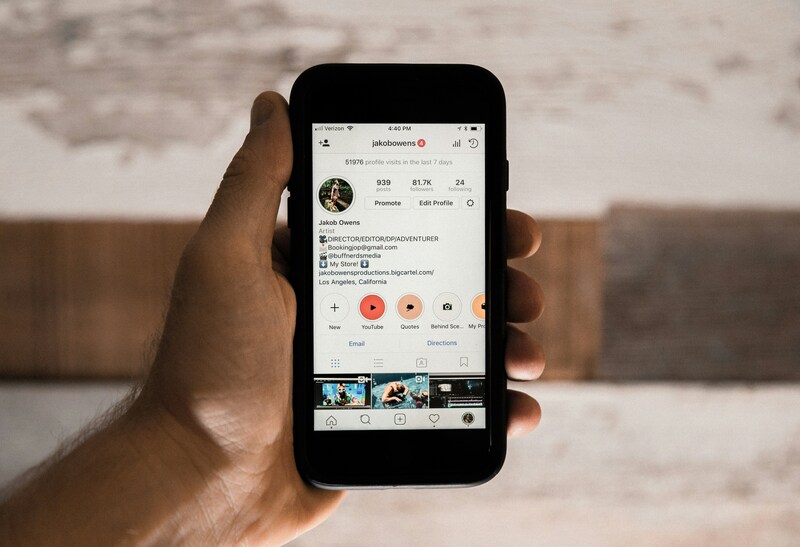
Instagram now has 3 billion monthly active users, and since 2023 every profile can show up to five links. In September 2026 Meta went further and started rolling out paid Meta One plans with a link page of up to 20 links. So the question is no longer "how do I fit more links in my bio?" It is "where should those links take people, and will they stay once they arrive?"
This guide collects 17 link in bio examples, from simple multi-link pages to creators who send followers straight into a community, plus what changed on Instagram this year and how to choose the right setup for you.
Instagram Bio Links, TL;DR:
Every Instagram profile can add up to five links for free. Meta One subscribers can use a link page with up to 20 links.
More links is not the same as more results. Lead with one primary action and keep the rest to three or four.
The strongest examples send followers somewhere they can take part, not just browse: a course, a challenge, an event or a community.
Link-in-bio tools like Linktree organise your links. A community platform like Swarm gives people a reason to come back.
That single link has become prime real estate for creators, coaches, and influencers looking to drive traffic, build communities, and convert followers into customers. The challenge is about making that one link work as hard as possible.
In this article, you'll find 12 proven approaches (with examples for inspiration), including but not limited to multi-hub landing pages, direct-to-community links, storytelling pages, product showcases, and mission-driven calls-to-action.
Let’s dive in 👇
What changed for Instagram bio links in 2026
Five native links. Instagram lets any account add up to five external links in Edit profile, then Links. Only the first shows on your profile, with "and X others" underneath, so the order matters. You can choose which link appears first.
Meta One link pages. In September 2026 Meta began rolling out Meta One creator plans. The Essential plan ($14.99 a month in Meta's announcement) includes a shareable link page with up to 20 links, images and custom text, and its own URL you can use outside Instagram. The Advanced plan ($49.99 a month) adds links inside a limited number of posts and reels each month. Prices and availability vary by country and account.
What this means for you. Link-in-bio tools are no longer the only way to show several links. Their value now is design, analytics and selling. The bigger decision is the destination: where you send the people who tap.
Why Your Link In Bio Strategy Matters More Than Ever
Instagram's algorithm prioritizes engagement and authentic connections. People — especially younger and older generations who are becoming tired of social media as it currently is — are increasingly seeking genuine, face-to-face interactions even in digital spaces.
This powerful shift toward authentic community building makes your Instagram bio link strategy crucial. It's no longer enough to simply drop in a website address and hope for the best.
More successful creators and brands are using their bio links to create seamless experiences that mirror real-world interactions. These people and businesses are building communities where members can connect through both live and asynchronous video. This helps them to foster relationships that feel genuinely personal.
Below are 12 examples of different types of successful Instagram bios 👇
#1 The Linktree Approach
Example: @donnahaymagazine, a very popular Australian chef and author, uses a link-in-bio tool to showcase her books, dozens of recipes, and newsletter subscription. It’s a perfect way to drive a natural interest in what she does into fans being loyal followers and customers.
Why it works: This approach gives followers multiple pathways to engage with your content ecosystem.
Best for: Content creators with diverse offerings, influencers with multiple revenue streams, or businesses with various product lines.

#2 The Direct-to-Community Strategy
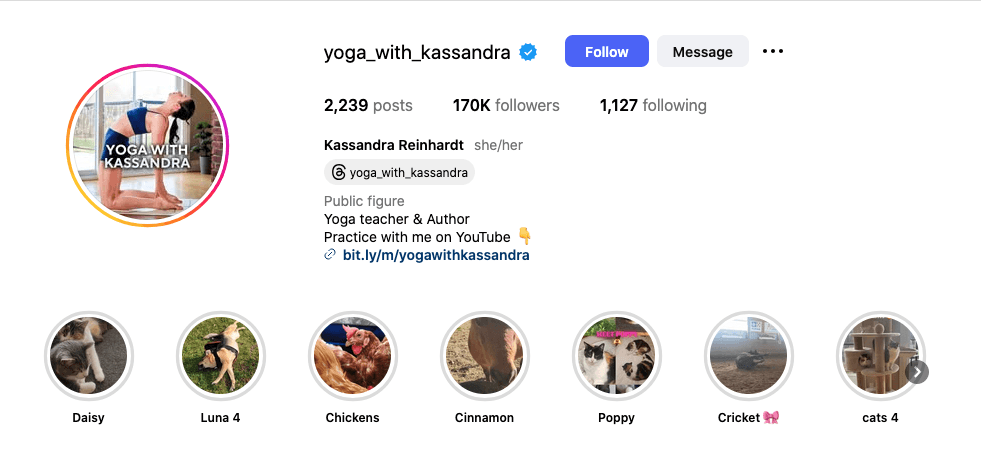
Example: @yoga_with_kassandra links directly to her video-first community platform where members can access live classes, participate in challenges, and connect through asynchronous video check-ins.
Why it works: It creates immediate access to deeper engagement opportunities beyond surface-level social media interactions.
Best for: Coaches, fitness instructors, small business owner educators, and anyone building a membership-based community.
This authentic approach recognizes that today's users want more than passive content consumption. They're seeking interactive experiences where they can participate, contribute, and build genuine relationships with both creators and fellow community members.
#3 A Storytelling Landing Page
Example: @minimalistbaker, a very popular chef (creator of “Simple recipes that make you feel GOOD. 10 ingredients or less, 1 bowl, or <30 minutes”), creates a custom landing page that tells her brand story through video, then guides visitors to recipes, courses, and community discussions.
Why it works: Video storytelling creates emotional connections that go beyond what purely static text can do.
Best for: Personal brands, mission-driven businesses, or creators who want to establish deeper connections before asking for conversions.
#4 A Product Showcase Hub
Example: @glossier, a popular skincare brand, uses Instagram Shopping integration combined with a custom bio link that showcases new products. Other important links include customer reviews via video testimonials, and behind-the-scenes content.
Why it works: Carefully combines retail with community, showing products in action while establishing and building more social proof.
Best for: eCommerce brands, product-based businesses, and creators selling physical goods (via Shopify, Etsy, Amazon, eBay, etc.).
#5 An Event-Focused Link
Example: @tedtalks (TED Talks) cross-promotes their content by rotating their bio link to highlight upcoming events, speaker spotlights through video content, and community discussions around each talk's themes.
Why it works: It creates urgency and exclusivity. At the same time, this builds anticipation through video previews, which then encourages community engagement.
Best for: Event organizers (like music events, etc.), conference speakers, workshop leaders, and seasonal businesses.
Want your link in bio to lead somewhere people stay? Swarm gives you a video-first community, courses and live events in one place. Try it free for 14 days.
#6 Create an Educational Resource Center
Example: @Natgeo (National Geographic) creates a bio link hub featuring documentaries, educational videos, conservation projects, and a community forum where nature enthusiasts share their own expedition videos.
Why it works: It positions the brand as the authority while creating opportunities for user-generated content (UGC) and community building.
Best for: Educational brands, nonprofits, thought leaders, or expertise-based businesses, including coaches.
Educational content performs exceptionally well when it includes interactive elements like community discussions, video Q&As, and peer-to-peer learning opportunities across other social media platforms.

#7 A Social Proof Strategy
Example: @Airbnb showcases guest stories through video testimonials, destination highlights, and a community platform where hosts and guests can connect and share experiences.
Why it works: Video testimonials and community stories build trust more effectively than written reviews alone.
Social proof becomes even more powerful when it includes video elements and community interaction. This allows potential customers to see and hear from real users in authentic settings.
Best for: Service-based businesses and professionals, like coaches, for example. This is useful because community-led growth is a powerful tool for community engagement and asynchronous coaching.
Pro tip for coaches just getting started with asynchronous coaching: Read our 5-step guide on this to help you launch this service.
#8 Multimedia Portfolio
Example: @annemariehamantphotography (AnneMarie Hamant, aka the Philadelphia Family Photographer) uses her bio link to showcase recent work, behind-the-scenes videos, and client testimonials. She uses Instagram to show her wonderful family photography work and win new clients.
Why it works: It demonstrates her creative skills and is a great way for people to visually see what photos of their family could look like.
Best for: Creative professionals, freelancers, artists, or anyone showcasing visual work. Portfolio links are most effective when they’re more than just displays of visual work.
#9 Seasonal Retail Campaigns

Example: @starbucks regularly updates their social media profile and bio link to reflect current campaigns, and seasonal offerings. They also do customer video stories, and community challenges around new products.
Why it works: It keeps content fresh and relevant while encouraging user participation and community engagement. Social media is also helping Starbucks drive customers back into stores.
Best for: Brands and coaches with seasonal offerings, campaign-driven marketing, or businesses that regularly launch new products.
Seasonal campaigns work best when they include interactive elements like video challenges, community discussions, and opportunities for customers to share their own content.
#10 A Collaboration Hub
Example: @spotify creates bio link pages featuring playlist collaborations, and artist spotlights through video content. They’re also really into using community spaces where music lovers can discover and discuss new artists.
Why it works: A clever use of artist partnerships while creating opportunities for community discovery and engagement.
Best for: Brands that frequently collaborate, platforms connecting creators, or businesses in partnership-heavy sectors like music, TV, film, and other types of content creators.
Collaboration hubs excel when they include video content that showcases authentic relationships and community spaces where audiences from different partnerships can interact.
#11 Take Fans Behind-the-Scenes
Example: @wework shares behind-the-scenes content from different locations, member spotlights through video interviews, and community forums where members can connect across locations.
Why it works: It humanizes the brand while creating connections between community members. A smart social strategy is helping WeWork to recover from its difficult road from a $47 billion valuation to bankruptcy.
Best for: Brands with physical locations, service-based businesses, or those wanting to showcase authentic company culture and the people behind the brand.
Behind-the-scenes content is most engaging when it includes opportunities for two-way interaction and community building among your audience.
#12 A Mission-Driven Call-to-Action

Example: @charity_water uses their bio link to share impact stories through video, donation opportunities, and a community platform where supporters can connect with beneficiaries and each other.
Charity Water, like many other organizations and people, also links to other social media accounts in their bio, and that’s also a successful approach.
Why it works: It combines storytelling with action, creating emotional connections that drive both engagement and conversions.
Best for: Nonprofits, mission-driven businesses, or brands with a strong social or environmental impact strategy.
Mission-driven links are most effective when they create opportunities for supporters to connect not just with the cause, but with each other through video sharing and community engagement.
#13 The native five-link profile
Example: any profile using Instagram's built-in Links setting. Put your main action first (it is the only one shown on your profile), then add up to four more: your community, your newsletter, your latest video and your booking page.
Why it works: no extra tool, no extra click, and people see a recognisable domain.
Best for: creators who only need a handful of links and want the simplest setup.
#14 The Meta One link page
Example: creators on a Meta One plan can build a link page inside Instagram with up to 20 links, images and their own shareable URL.
Why it works: the page opens without leaving Instagram, which keeps the experience fast on mobile.
Best for: creators who already pay for Meta One for verification or scheduling and want everything in one place. If you sell, track or run a community, you will still want a destination you control.
#15 The creator storefront
Example: tools such as Stan and Beacons turn the bio link into a mini shop for digital products, bookings and paid downloads.
Why it works: the follower can buy in one or two taps, without a separate website.
Best for: coaches and creators selling a small number of digital products or calls.
#16 From event to community: Veteran Social
Example: Ryan, a retired US Army officer, ran an annual conference for the veteran community. He built a free online community on Swarm so attendees could keep talking all year, and grew it to more than 300 members in the first 90 days. Read the full story in our conference-to-community case study.
Why it works: the link leads to a place people can join and return to, rather than a one-off page.
Best for: event organisers, associations and anyone with an audience that only meets once or twice a year.
#17 From YouTube channel to coaching membership: JawHacks
Example: Ronald Ead runs JawHacks, a YouTube channel about jaw and airway treatment. His coaching page leads into a membership with live coaching, Q&A calls with guest experts, and a video-first community on Swarm.
Why it works: viewers who want more than free videos get one clear next step, with the creator and other members on the same journey.
Best for: educators and coaches whose free content already answers the first questions, and whose audience needs support over months.
(Note for Gavin: these two are Swarm customers. I have not checked whether their Instagram bio links point to these pages, so the copy describes the destination, not their Instagram profile. Please check with Ryan and Ron before naming them in a list like this, and consider asking for a screenshot.)
Where should your link in bio go?
Most link-in-bio pages are a list of exits. Someone taps, sees six buttons, picks one and is gone. That is fine if you only want a quick click. But if you are a coach, educator or creator, the most valuable thing you can offer a new follower is somewhere to stay.
That is why more creators point their main link at a community: a place where new followers can introduce themselves, join a live session, try a short challenge, and meet other people working on the same thing.
On Swarm, that destination can be:
A free community space where new followers land, say hello on video and see what members are talking about.
A Community Learning course. Launched in October 2026, Community Learning lets you add a prompt to any lesson so members post homework, reflections or short video responses underneath, and see and reply to each other's work. Courses were never meant to be watched alone.
A live event or challenge with RSVP, so a new follower has a date in the diary before they forget about you.
A paid membership or course, sold on its own or with community access.
A simple pattern that works: make your first Instagram link "Join the free community", and use the other four for your newsletter, your latest video, your booking page and your shop.
Create a community in Swarm
Your followers showed up for you, not a text feed. Swarm’s video-first communities unlock the depth of connection and learning that AI can’t touch.
Tools and Platforms for Multiple Links in Instagram Bio
While Instagram limits you to one link, several tools can help you maximize that real estate:
Linktree and similar services: These create simple landing pages with multiple clickable options. They're easy to set up but offer limited customization and community-building features.
Custom landing pages: Building your own landing page gives you complete control over the experience and can include video content, community access, and advanced analytics.
However, even with AI coding tools and drag-and-drop editors, this can take some time. Not ideal if you just want a platform up and running to support your social media strategy.
Video-first community platforms: Platforms like Swarm focus on creating engaging experiences through face-to-face interactions, combining the functionality of link-in-bio tools with robust community features.
The key is choosing a solution that not only organizes your links but also creates opportunities for meaningful engagement and relationship building.
Ready to transform your Instagram bio link strategy? Consider platforms that prioritize authentic video interactions and community building, like Swarm, which helps creators build engaging communities through both live and asynchronous video connections.
8 Best Practices for Link In Bio Success
Whether you use your Instagram as a business, coach, consultant, digital creator, or influencer, there are clear, tried-and-tested best practices that work for everyone. No matter how many followers you’ve got.
It’s also important to remember that your bio link is a reflection of your follower numbers and overall account engagement. One drives the other. So, if your content is doing well, then more people will click through that all-important bio link.
Here are some simple best practices for Instagram bio links:
Focus on one primary action and no more than three or four others. While you want to offer multiple options, avoid overwhelming visitors with too many choices. Focus on no more than 3 to 5 key actions you want people to take, and this includes the use of Linktree and similar tools.
Use clear Call-to-Actions (CTAs): Make it obvious what you want visitors to do. Use action words like "Watch," "Join," "Discover," or "Connect."
Include video content and a visually appealing background image. Video content significantly increases engagement and conversion rates, so use video backgrounds, testimonials, or community features.
Update regularly: Keep your bio link fresh by rotating content, highlighting new offerings, or featuring seasonal campaigns.
Mobile optimization: Since most Instagram users are on mobile, ensure your landing experience works perfectly on smartphones.
Track performance: Use analytics to understand which links perform best and adjust your strategy accordingly.
Choose your primary link. With five links, only the first is visible. Make it the one action you want most this month.
Tag every link. Add UTM parameters so you can see which link actually brings people in.
FAQs
How many links can you put in your Instagram bio?
Up to five, using Edit profile, then Links. Only the first one shows on your profile, so put your most important link first. Meta One subscribers can create a link page with up to 20 links.
What should I put in my link in bio?
Do I still need Linktree now Instagram allows five links?
What is a good link in bio for coaches?
How do I add a link in bio on Instagram?
How do I track clicks from my link in bio?
Instagram Bio Links Key Takeaways
An Instagram bio link is one of the most valuable pieces of digital real estate you or your company owns. The 12 examples and strategies outlined in this article show how leading creators and brands are maximizing this site opportunity to build genuine communities and drive meaningful engagement.
There are numerous routes to success you can take, including:
Organizing multiple links so that fans or customers don’t need to search around for the most crucial pieces of information they need.
Creating experiences that foster real connections between you and your audience
Video-first approaches that prioritize face-to-face style interactions
All of these are proving most effective at building engaged, loyal communities of fans that drive long-term success.
Ready to transform your Instagram bio link strategy? Consider platforms that prioritize authentic video interactions and community building, like Swarm, which helps creators build engaging communities through both live and asynchronous video connections.

